Follow any website, even without an RSS feed
With Feedwright you can follow sites that offer no feed. You paste the address, Feedwright builds the feed from the page itself, and new articles land unread in your list on iPhone and iPad.
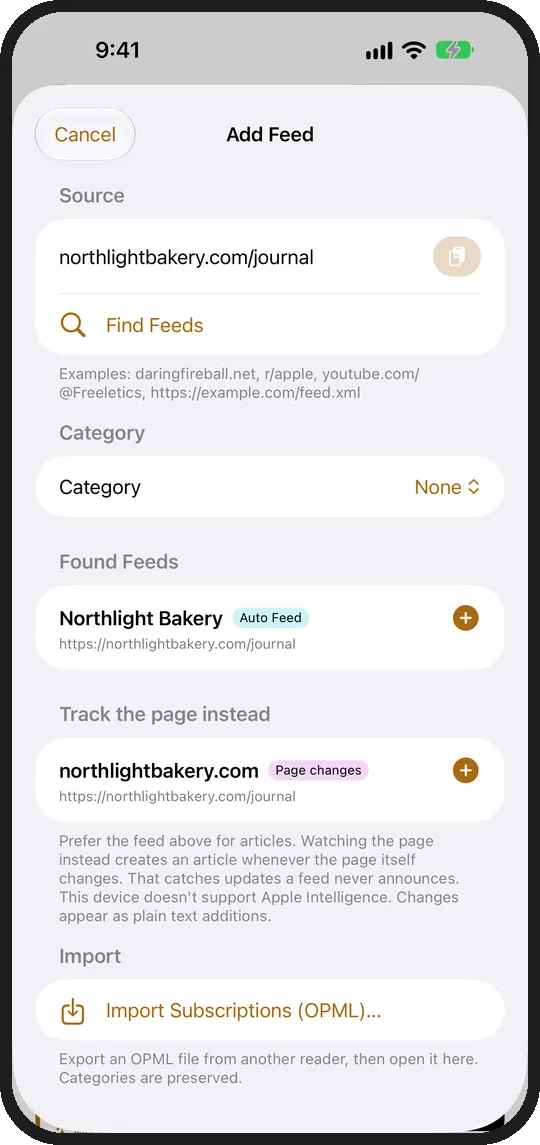
How do I follow a site that has no RSS feed?
Tap + and paste the address of the site. If the site has no feed, Feedwright opens the Auto Feed and shows the articles it found on the page. Tap Add, and the site is in your list.
Which sites can I follow this way?
Any site that shows a list of articles:
- a blog without RSS
- the news page of a club or a town
- a company's press releases
- a section of your newspaper
How do I hear about new articles?
New articles appear unread in your list, alongside the articles from your other feeds. Feedwright adds the lead image and teaser from the site.
What happens when the site is redesigned?
Feedwright finds the articles again on its own after a redesign. You don't need to do anything.
What if a page has no articles at all?
Then you watch it for changes. Feedwright reports when something moves there, as a line in the same list. More on Monitor websites for changes.
Do I need an account or a service for this?
No. Feedwright needs no account and no service in between. Your iPhone or iPad reads the site itself.
How many sites can I follow?
The app includes 15 sources, feeds and sites together. With Feedwright Plus you follow as many as you like.