 Peal
Peal
Calendar alarm for iPhone, iPad and iPhone Duo
No appointment slips past.
Peal turns the appointments you must not miss into real alarms: full screen, through Silent mode and Focus. Peal keeps ringing until you stop the alarm.
Download on theApp StoreNo account·No server· Reads the calendars your device already has

The difference
Why a notification is not enough
Calendar notifications are quiet by design. They arrive while the device is face down, during a Focus session, or as one of twenty. For most appointments that is exactly right.
Without Peal
Face down, Focus on, sound off. The notification arrived and went unseen.
With Peal
Keeps ringing until you end it. On silent, and in Focus.
Rules
Which appointments ring
Switch between the rules and watch what happens to the day. This is what the Today screen looks like in the app, down to the line that says why an appointment stays quiet.
On top of that: single appointments with the switch on the row itself, participants by name or address, repeating appointments for this date or the whole series, and the lead time. All-day appointments never ring.
Screens
What Peal looks like
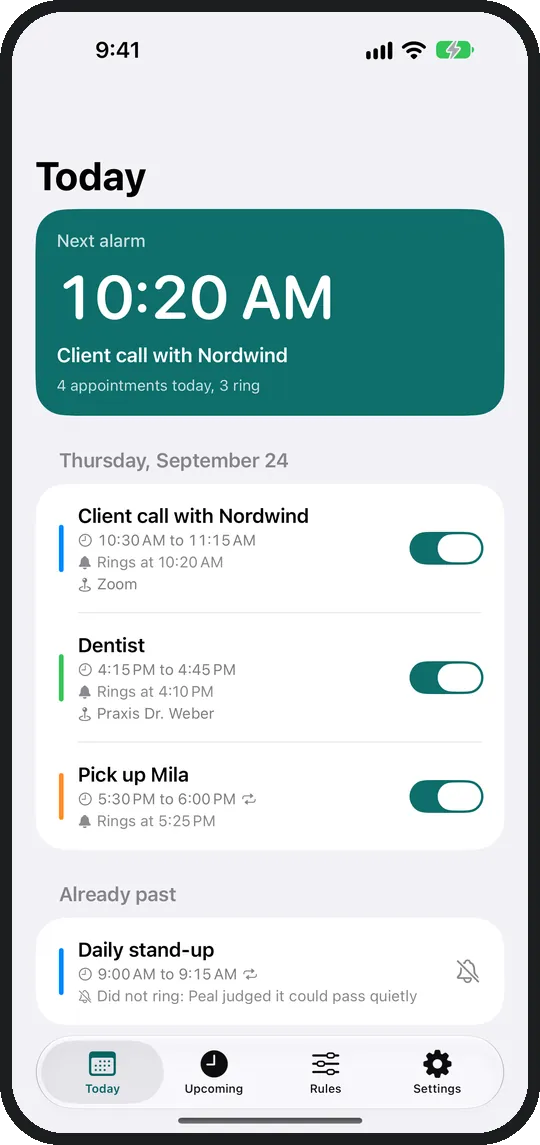
Today Under every appointment: when it rings, or why it does not. 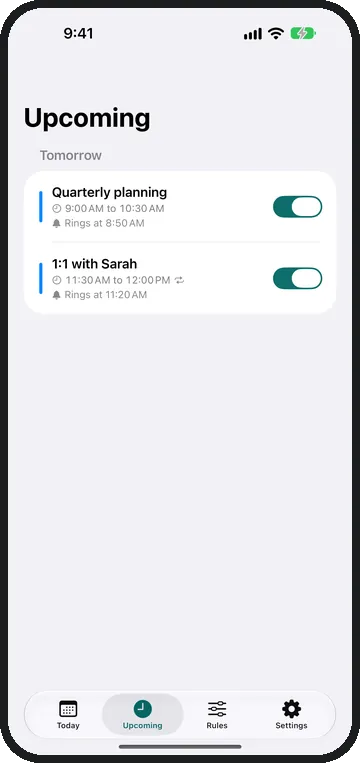
Upcoming Eight days ahead, sorted by day. 
Rules Calendars, keywords, series, quiet hours, lead time. 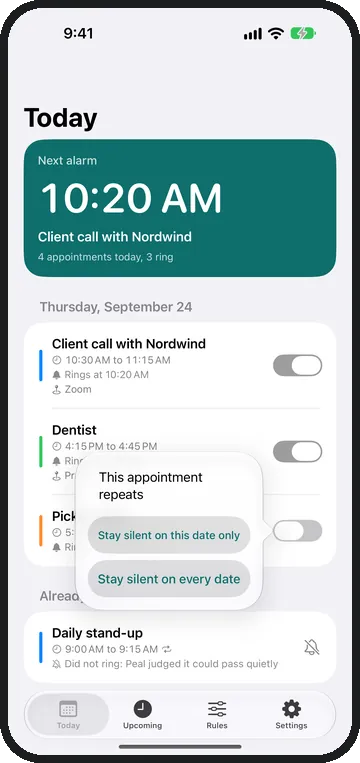
Series This date only, or the whole series. 
Settings Tone, calendar sync, permissions, log.
Privacy
Nothing leaves your device.
Peal has no server. Your appointments are read on the device and stay there.
Subscription
Peal Plus
Everything above belongs to the app. Plus adds the smart alarms, and the finer settings.
Smart alarms
Apple Intelligence on your device works out what kind of appointment it is. Blocks of time, visits and information stay quiet. Travel rings 2 hours ahead and appointments on site 45 minutes ahead. An appointment your keywords missed can still ring. The decision is made on the device; the appointment never leaves it.
- A different tone Five of Peal's own, and one per calendar.
- Pause until a date For a holiday, globally or for one calendar.
- Lead time per calendar 5 minutes for work, 30 for private.
- Lead time for one appointment For this date, or the whole series.
- Weekdays per calendar The work calendar rings Monday to Friday.
- Repeating only, or one-off only The series filter, in both directions.
- Ring again A second button on the alarm that pushes it back a few minutes.
Family Sharing makes one subscription count for everyone in your family. If it lapses Peal keeps ringing: what is left is exactly the rules you set yourself.
Help
Common questions
It does not ring. Why?
Work through these four in order:
- Peal needs two permissions: your calendar and your alarms. Both are in iOS Settings under Peal, and inside Peal under Settings, "Permissions".
- The calendar has to be switched on under Rules. The first switch on a calendar's screen decides whether it rings at all.
- Today says under every appointment why it rings or stays quiet. Quiet hours, a pause or a weekday rule name themselves there.
- All-day appointments never ring.
An appointment is missing.
Peal sees exactly the calendars the Calendar app shows. If an account is missing there, so are its appointments. Add it in iOS Settings under Apps, Calendar. Peal looks eight days ahead.
Nothing arrives after closing the app.
Leave Peal in the app switcher. Swiping it away stops every background update until you launch it by hand again, and new appointments stop getting an alarm. The path that survives even that is the Shortcuts automation, and Peal walks you through it step by step under Settings, Calendar sync.
Which calendars does Peal read?
iCloud, Google, Outlook, Exchange and Microsoft 365: whatever your device already syncs. One system permission covers them all. Peal needs no new login and no account with us.
Does Peal ring on silent and in Focus?
Yes. Peal sets real system alarms, and those are exempt from Silent mode and Focus. The alarm is full screen and keeps ringing until you stop it.
Does Peal run on iPad and iPhone Duo?
Yes. On an open iPhone Duo, Today and Upcoming show the list on the left and an appointment on the right. Closed, an alarm rings full screen as on any iPhone. What is different on iPad is on the page Peal on iPad.
What does Peal cost, and what is in the subscription?
The app and every rule you set yourself are included: calendars, keywords, participants, quiet hours, the lead time for all appointments, and the switch on each individual row. Peal Plus adds the smart alarms and the finer settings listed above under "Peal Plus". There are seven days to try them for free.
Why is there Peal Plus?
Because an app costs money before anyone downloads it. Publishing on the App Store alone costs 99 dollars a year, and Apple keeps a share of every subscription. On top of that come devices for testing and the tools for development. My working time is not part of that at all. Plus is meant to help cover these costs so that Peal keeps being looked after. Every rule you set yourself works without Plus as well.
How do I cancel Peal Plus?
The subscription runs through your Apple Account. You manage and cancel it in iOS Settings, at the top under your name, then Subscriptions. If it lapses Peal keeps ringing, with the rules you set yourself.
Contact
Write to me. Include your iOS version and what you expected to happen. Those are the two things that are missing most often.